
In many workplaces today, managing information is part of everyday tasks. Businesses keep records of customers, schools track student information, and offices store employee and project data. When the amount of information grows, using simple lists or spreadsheets can quickly become difficult to manage. This is where Microsoft Access becomes very useful.
MS Access, often simply called Access, is a database program designed to help users organize large amounts of data in a structured and efficient way. Instead of storing everything in one long spreadsheet, Microsoft Access allows you to create a proper database where information is stored in connected tables. This makes it easier to find, update, and analyze data whenever you need it.
Many people are familiar with tools like Excel, but MS Access works differently. It focuses on building databases that can handle more complex data relationships. For example, a small business can use Access to track customers, products, and orders all in one system while keeping everything organized.
The good news is that you do not need to be a programmer to start using Microsoft Access. The program provides visual tools that help beginners create tables, forms, queries, and reports with ease. Because of this, Access has remained one of the most practical database tools for small businesses, offices, and even personal projects.
In this guide, you will learn what Microsoft Access is, how MS Access works, and why it is still widely used today. By the end of this article, you will have a clear understanding of how Access can help you manage data more efficiently.
What is Microsoft Access?
Microsoft Access is a database management system developed by the Microsoft Corporation. It is part of the Microsoft Office suite, just like Word, Excel, and PowerPoint. The main purpose of MS Access is to help users create and manage databases in an organized and efficient way.
A database is simply a structured collection of information. For example, a school may store student records, a store may track inventory, and a company may manage employee information. Instead of using multiple spreadsheets, Access allows you to store all related data in one database.
Unlike simple spreadsheet tools, Microsoft Access is designed specifically for handling large amounts of structured data. It allows users to create tables, connect information, run queries, build forms, and generate reports.
Because of its flexibility and powerful features, MS Access is widely used by small businesses, offices, and individuals who need a reliable database solution.
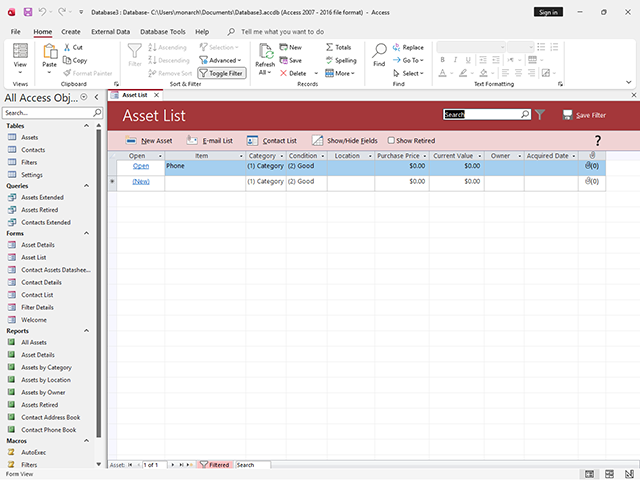
Why Microsoft Access is Important
Many people ask why they should use Microsoft Access instead of just using spreadsheets like Excel. While spreadsheets are useful for calculations and simple data lists, Access is designed to manage complex data relationships.
For example, imagine a small business managing customer orders. In a spreadsheet, all information may be stored in one large table. This can become messy and difficult to manage. With MS Access, the data can be separated into different tables such as customers, products, and orders, while still being connected.
This structure makes it easier to organize, search, and analyze data.
Another advantage of Microsoft Access is automation. It allows users to create forms for easy data entry, queries for finding information quickly, and reports for professional presentations.
Because of these features, Access helps improve productivity and reduce errors when working with large datasets.
Main Components of Microsoft Access
To understand how MS Access works, it is important to learn its main components. These components work together to create a complete database system.
Tables
Tables are the foundation of every Access database. A table stores raw data in rows and columns.
Each row represents a record, while each column represents a field. For example, a student table may contain fields such as Student ID, Name, Age, and Course.
Tables help organize data in a structured format so it can be easily managed.
Queries
Queries are used to search and filter data in Microsoft Access. Instead of manually scanning large tables, you can create a query to retrieve specific information.
For example, a query can show:
- All customers from a specific city
- Products with low inventory
- Employees hired in a certain year
Queries make it easier to analyze information stored in your MS Access database.
Forms
Forms are user-friendly screens used for entering and editing data. Instead of typing information directly into tables, users can use forms that look like simple input pages.
Forms are helpful because they make Access databases easier to use, especially for beginners or employees who are not familiar with databases.
Reports
Reports allow you to present information in a structured and professional format. Reports are commonly used for printing summaries, financial statements, and data analysis results.
For example, a report in Microsoft Access may show:
- Monthly sales summary
- Employee attendance records
- Inventory status
Reports transform raw data into meaningful information.
Key Features of MS Access
Microsoft Access offers many powerful features that make database management easier.
One of its most important features is data relationships. This allows tables to be connected using common fields. For example, a customer table can be linked to an orders table through a Customer ID.
Another useful feature is data validation. This ensures that only correct information is entered into the database. For instance, a field may require numbers only or limit entries to a specific format.
Automation is also possible with macros and VBA (Visual Basic for Applications). These tools allow users to automate repetitive tasks and create advanced database functions.
Because of these features, Access is considered a powerful yet beginner-friendly database system.
How Microsoft Access Works
Understanding how MS Access works can make it easier to start using it. The process usually begins with creating a new database file.
When you open Microsoft Access, you can create a blank database or choose from pre-designed templates. The database file usually has the extension .accdb.
After creating the database, the next step is building tables to store your information. Each table should represent one type of data, such as customers, employees, or products.
Once tables are created, relationships can be established between them. This helps connect related data and prevents duplication.
Next, you can create forms for easy data entry and queries to retrieve information quickly. Finally, reports can be generated to present your data clearly.
This structured approach is what makes Access different from ordinary spreadsheets.
Common Uses of Microsoft Access
Many organizations use MS Access for different types of data management tasks. Small businesses often use Microsoft Access to track customers, sales, and inventory. Because it is easy to customize, it can be adapted to many business needs.
Schools and educational institutions may use Access to store student records, class schedules, and academic information. Some offices use MS Access for project management, employee databases, or internal reporting systems.
Even individuals can use Access for personal projects such as managing collections, event planning, or maintaining contact lists. Because of its flexibility, Microsoft Access can be used in many industries.
Advantages of Using Microsoft Access
One major advantage of Access is its integration with other Microsoft Office applications. Data from MS Access can easily be imported into Excel for analysis or used in Word for mail merge.
Another benefit is its user-friendly interface. Unlike complex database systems, Microsoft Access provides visual tools that allow beginners to build databases without deep technical knowledge.
Cost is also an advantage. Since Access is included in many Microsoft Office subscriptions, businesses can use it without purchasing expensive database software.
Additionally, MS Access supports multi-user environments. This means several people can work on the same database at the same time when it is stored on a shared network.
Limitations of Microsoft Access
Although Microsoft Access is powerful, it also has some limitations.
One limitation is scalability. Access works best for small to medium databases. Large companies with massive data systems often use enterprise-level databases like SQL Server.
Another limitation is performance when too many users access the database at the same time. In such cases, a more advanced database system may be required.
Despite these limitations, MS Access remains one of the best tools for small organizations and beginners learning database management.
Tips for Beginners Learning MS Access
If you are new to Microsoft Access, starting with simple databases is the best approach. Begin by creating a small project, such as a contact database. This will help you understand how tables, queries, forms, and reports work together.
It is also helpful to plan your database structure before entering data. Decide what tables you need and how they should be connected.
Learning how relationships work in Access is also important. Proper relationships help maintain data accuracy and prevent duplicate information.
Finally, explore templates available in Microsoft Access. These templates provide ready-made database structures that you can customize according to your needs.
With practice, you will become more comfortable using MS Access to organize and analyze information.
Microsoft Access vs Excel
Many beginners compare Access and Excel because both are used to manage data. Excel is ideal for calculations, charts, and quick data analysis. However, it is not designed for complex data relationships.
On the other hand, Microsoft Access is built specifically for database management. It allows users to store related data in multiple tables and connect them through relationships.
In simple terms, Excel is best for calculations and data analysis, while MS Access is best for structured data storage and management.
Many organizations actually use both tools together to maximize productivity.
The Future of Microsoft Access
Even though many cloud-based databases exist today, Microsoft Access continues to be widely used around the world.
Microsoft regularly updates Access to improve performance, security, and compatibility with modern systems. It also integrates with Microsoft 365, allowing users to connect databases with other productivity tools.
For beginners learning database concepts, MS Access remains one of the easiest platforms to start with. Its visual interface and powerful features make it a valuable tool for both personal and professional use.
Conclusion
Microsoft Access is a powerful yet easy-to-use database management system that helps users organize, store, and analyze data efficiently. Whether you are running a small business, managing student records, or handling office data, MS Access provides the tools needed to create structured databases.
By using tables, queries, forms, and reports, users can transform raw data into meaningful information. While it may not replace large enterprise databases, Access remains one of the best solutions for small to medium data management tasks.
Learning Microsoft Access can also improve your digital skills and open opportunities in many industries that rely on data organization.
If you want a practical way to manage information beyond spreadsheets, MS Access is definitely worth learning.